

Designing a rule-based automation system for utility operations
User Journeys | Logic Mapping | Wireframes | Interaction Design | UI Spec
Role
User Experience Lead
Team
1 PM, 2 Engineers, 1 UX
Time frame
Project
New strategic initiative
4 months
Event Data and Action Manager (EDAM): Making complex system logic visible, testable, and trustworthy
Old Event Analyzer required deep technical expertise (XML, SQL), creating a severe operational bottleneck where only admins could configure and deploy business logic––leaving day-to-day operations teams stranded and dependent on engineering support to manage critical alerts.
I designed a no-code visual workflow builder that empowers non-technical operators to define, test, and monitor complex automation logic directly within the UI—handling thousands of daily events without writing a single line of code.
Problem
Event data existed, but wasn't usable in practice because:
-
Rule creation required XML + SQL expertise (no UI)
-
High rate of false positives reduced trust
-
No way to preview outcomes before execution
-
Making changes required admin support
Critical operational issues (like outages or failing meters) were often missed or not addressed on time.
Goal
Design an MVP (0→1), a new UI that allows non-technical users to:
-
Define detection rules using event + meter data
-
Trigger automated actions
-
Simulate before execution to predict outcomes
-
Monitor results and iterate on rule performance over time
My Role
As a sole designer (UX Lead) on the team, I...
-
Created user journeys, wireframes, and UI Specs to align cross-functional teams
-
Partnered closely with engineering to map out conditional rule logic, validations, and edge cases
-
Collaborated with the PM to scope the MVP under tight technical and engineering constraints
Key Insight
This wasn't just a UI problem––it was a mental model problem. I needed to bridge the gap between complex backend architecture and human intuition, helping users understand how the system was structured and how it behaved.
-
Rule logic had a steep learning curve
-
New users struggled to comprehend the complex structure
-
Outcomes were unpredictable until after execution
-
Rule refinement required escalation to admins
Design challenge
How might we help users understand, predict, and trust system behavior before taking action?
Design approach
Making System Logic Understandable and Safe
I focused on making system logic
-
Visible — so users can understand how decisions are made
-
Controllable — so they can safely define and adjust logic
-
Testable — so they can validate outcomes before activation
Reducing cognitive load through staged workflows
Create → Configure → Test → Review → Iterate → Monitor
I collaborated with PM to define a structured workflow resulting in this high-level user journey:

Instead of presenting everything at once, I broke configuration into focused steps:
-
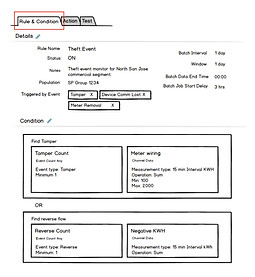
Rules & Conditions (define logic)
-
Actions (define outcomes)
-
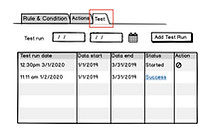
Test (validate behavior)

Due to time constraints and to leverage existing design components, I chose to use tabs to separate these steps.
Rules & Conditions tab
Action tab

Test tab
This allowed users to focus on one mental task at a time, rather than managing the entire process at once.
✔ Reduced cognitive overload
✔ Improved decision clarity
✔ Made configuration approachable for non-technical users
Making the system logic explicit through structure
I analyzed the system logic in XML, and defined a clear rule model:
-
A Rule can have multiple Conditions
-
Conditions are made of Condition Blocks
-
Logic follows:
-
Conditions = OR
-
Condition Blocks = AND
-

This structure was translated into a tree-based interface, allowing users to visually understand hierarchy and relationships.
Instead of writing logic, user could now see and build it visually. Once users understand the model, they can create infinitely flexible rules without needing technical knowledge.

Conditions configuration dialog
Alternatives I explored:
-
Linear forms → too restrictive
-
Templates → not flexible enough
-
Natural language → possibility, but not viable for MVP
Designing for predictability through simulation + feedback
A key issue was uncertainty. Users couldn't predict system behavior until after activation.
To solve this, we came up with two key mechanisms:
a. Simulation (before activation)
b. Detection log (after execution)
This created a continuous feedback loop between design → test → real-world outcome → refinement.
✔ Prevented costly mistakes by misconfigurations (e.g., mass work orders sent)
✔ Increased confidence in rule setup and system behavior
✔ Enabled users to actively learn system behavior over time
Simulation - Test with historical data
Users can run rules against past data to:
-
Preview which events would trigger
-
Validate edge cases
-
Refine logic safely before activation


Add test run - Select date range to use historical data
Detection log - Feedback loop
I designed action outputs page that included custom message with dynamic variables (e.g., $value), that shows what triggered the rule.
This allowed users to:
-
See exactly what triggered a rule
-
The actual values at the time of execution
-
Adjust thresholds based on observed behavior

Actions configuration dialog
Guidance, Feedback, and Validation
To make technical concepts approachable I collaborated with Docs on:
-
Tooltips and help text
-
Inline guide text and field definitions
-
Dynamic validation message for logic errors
✔ Reduced user errors
✔ Increased confidence in during configuration

Outcome
I delivered a working MVP that enables non-technical users to define, test, and deploy rule-based automation on large-scale event and meter data—with full auditability and traceability built in.
The solution is currently in the hands of select enterprise customers, where it is being actively used to validate core concepts and workflows in real-world conditions.
This work established a foundation for scalable, self-serve automation within the platform—positioning the MDM product with a clear competitive advantage in operational intelligence and workflow automation. View Siemens' data sheet here.
Constraints & Tradeoffs
We intentionally did not focus on visual polish––shipping a usable system was the priority.
-
3-month MVP timeline → prioritized clarity and function over polish
-
Limited components library → reused existing patterns to move faster
-
Cross-functional, distributed team → relied heavily on clear specs & async collaboration
Real-world Applications
Public safety
Detect critical events (e.g., outages, gas leaks) in real time
Revenue protection
Identify failing meters using event patterns
Quality monitoring
Detect repeated threshold variances over time
Key Learnings & Reflections
Clarity > Visual polish
In complex systems, usability depends on making logic understandable than making interfaces visually refined.
Designing behavior is designing the product !
The core challenge wasn’t UI—it was defining how rules work, how they’re interpreted, and how outcomes are triggered.
-
Trust is built through predictability and feedback loops
-
Complex systems become usable when broken into structured mental models
-
Close collaboration with engineering leads to better product decisions
Next Steps
-
Identify common rule patterns to simplify setup
-
Introduce templates for frequent use cases
-
Improve rule validation based on user feedback